
Home / Marketplace
More Demand. More Competition. More Value From Every Impression.
Connect your inventory to global demand through PMP, Programmatic Guaranteed, Open Marketplace and TapMind’s DSP. Bring your own demand into the Marketplace and optimize yield across your inventory.
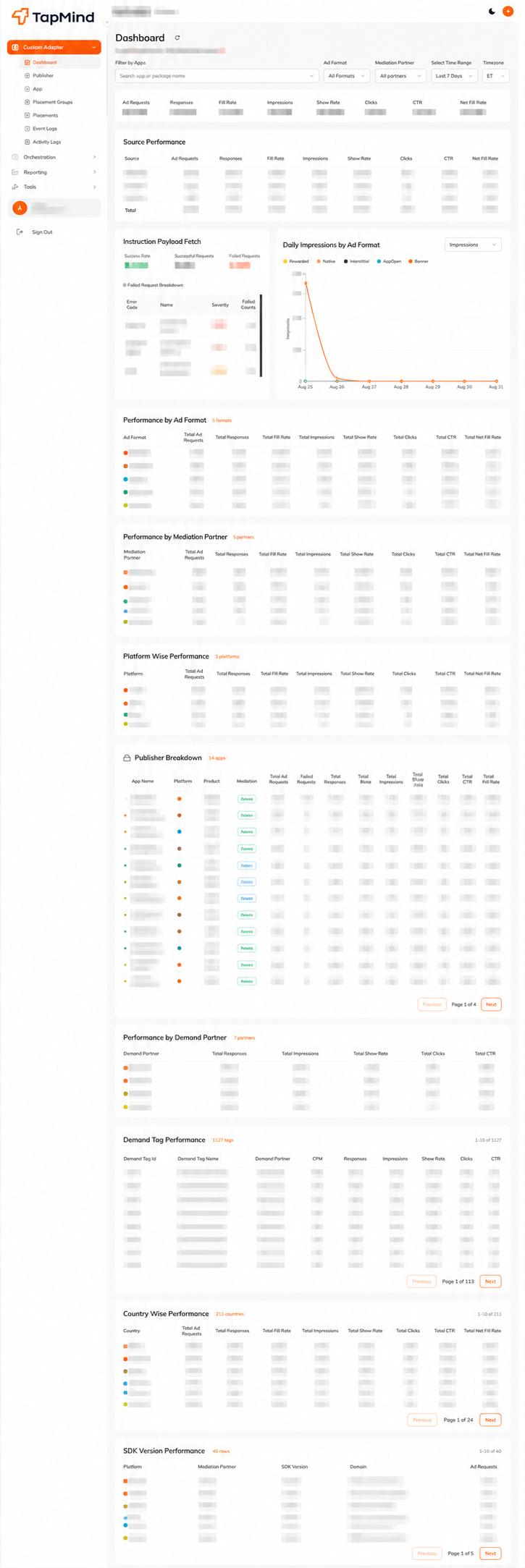
- Real-Time Reporting
- Net 30 Payouts
- 80+ Demand Partners
- Advanced Ad Quality
- Brand Budgets
Trusted Across the Global Advertising Ecosystem
TapMind Marketplace brings together publishers and a broad network of demand partners, creating more opportunities to monetize inventory and reach valuable audiences.
Publishers











Advertisers & agencies








Buyers (SSPs)












Partner marks are shown for identification only.
Why Publishers Choose TapMind Marketplace
More demand matters when it creates measurable improvement in how your inventory earns.
Integration time
TestTesting time
CompeteIncremental revenue on waterfall
GrowTapMind Marketplace brings multiple demand sources into the same commercial environment, while its Yield Layer tracks inventory performance to identify opportunities for better yield. Publishers can also bring their own demand into the Marketplace, so optimization is not limited to demand sourced by TapMind.
One Marketplace. Works With Your Existing Stack.
TapMind Marketplace works across multiple mediation platforms and app frameworks, so publishers can add Marketplace demand without rebuilding the monetization stack they already use.
Mediation platforms




Frameworks


Choose How TapMind Marketplace Fits Into Your Stack
Connect TapMind Marketplace through the integration path that best fits your current monetization architecture and the way your inventory is already served.
Custom Adapter
Connect TapMind Marketplace as an additional demand path through your existing mediation setup, using a dedicated adapter instead of replacing the mediation platform already serving your inventory.
- Publisher App
- Existing Mediation
- Custom Adapter
- TapMind Marketplace
- Global Demand
In-App Orchestration SDK
Use TapMind’s In-App SDK when you need a direct integration with your app and deeper control over how Marketplace demand is requested, handled and served.
- Publisher App
- Orchestration SDK
- TapMind Marketplace
- Global Demand
GAM ID
Use your Google Ad Manager ID to access GAM demand through TapMind’s Yield Layer, without integrating the TapMind SDK.
- Publisher App
- Google Ad Manager
- Mapped Placement IDs
- TapMind Marketplace
- Global Demand
VAST Tags
Use VAST Tags to connect TapMind Marketplace demand to video inventory through your existing VAST-compatible ad-serving workflow, without requiring an additional in-app SDK integration.
- Video Player
- VAST Tag
- TapMind Marketplace
- Video Demand
See What TapMind Partners Say
Hear how publishers and demand partners use TapMind Marketplace to expand opportunities, improve monetization and make better-informed decisions.
“TapMind gave our monetization team a more structured way to evaluate new demand without making every experiment another engineering project.”
Aditi RaoHead of MonetizationPlaybyte Games
“We kept the mediation setup we already trusted and still opened up demand we could not reach before.”
Marcus HaleDirector of Ad OperationsNorthline Apps
“The reporting made it obvious which partners deserved priority, so the decisions stopped being guesswork.”
Sofia MarchettiGrowth LeadKite OTT
“Testing a new partner used to mean a release cycle. Now it is a configuration change and a week of data.”
Daniel OkaforVP RevenueTapstack Studios
“Support actually understands mediation. Onboarding a demand partner took days, not quarters.”
Hana KimMonetization ManagerSnapline Media
“Our fill improved without touching the partners we already had in place.”
Rahul MenonProduct Owner, AdsVerdant Utilities
“TapMind gave our monetization team a more structured way to evaluate new demand without making every experiment another engineering project.”
Aditi RaoHead of MonetizationPlaybyte Games
“We kept the mediation setup we already trusted and still opened up demand we could not reach before.”
Marcus HaleDirector of Ad OperationsNorthline Apps
“The reporting made it obvious which partners deserved priority, so the decisions stopped being guesswork.”
Sofia MarchettiGrowth LeadKite OTT
“Testing a new partner used to mean a release cycle. Now it is a configuration change and a week of data.”
Daniel OkaforVP RevenueTapstack Studios
“Support actually understands mediation. Onboarding a demand partner took days, not quarters.”
Hana KimMonetization ManagerSnapline Media
“Our fill improved without touching the partners we already had in place.”
Rahul MenonProduct Owner, AdsVerdant Utilities
“TapMind gave our monetization team a more structured way to evaluate new demand without making every experiment another engineering project.”
Aditi RaoHead of MonetizationPlaybyte Games
“We kept the mediation setup we already trusted and still opened up demand we could not reach before.”
Marcus HaleDirector of Ad OperationsNorthline Apps
“The reporting made it obvious which partners deserved priority, so the decisions stopped being guesswork.”
Sofia MarchettiGrowth LeadKite OTT
“Testing a new partner used to mean a release cycle. Now it is a configuration change and a week of data.”
Daniel OkaforVP RevenueTapstack Studios
“Support actually understands mediation. Onboarding a demand partner took days, not quarters.”
Hana KimMonetization ManagerSnapline Media
“Our fill improved without touching the partners we already had in place.”
Rahul MenonProduct Owner, AdsVerdant Utilities
Monetize Across the Formats That Matter
Banner Ads
A narrow horizontal placement anchored to the top or bottom of the screen while the app stays in use.
Talk to TapMind9:41App
AD Shop now
Shop nowThe app is in use with no ad on screen.
MREC Ads
A medium rectangle placed inside the content itself, taller and deeper than a banner.
Talk to TapMind9:41App
AD Shop now
Shop nowContent loads with a gap reserved between blocks.
Interstitial Ads
A full-screen ad shown between natural transitions in an app experience.
Talk to TapMind9:41App
Loading next screen
AD Shop now
Shop nowThe user moves between two screens.
Rewarded Video
A user-initiated ad that offers a reward after completing an ad interaction.
Talk to TapMind9:41App
Level 4 completeOut of lives. Get one more to keep playing.Watch video to get a rewardReward received
AD Shop now
Shop nowThe player reaches a moment where a reward is available.
Native Ads
An ad designed to match the surrounding content, layout, and user experience.
Talk to TapMind9:41App
 Noise-cancelling headphones, built for the commuteSPONSORED
A content feed loads: headline, thumbnail, summary.
9:41App
Opening app
AD Shop now
Shop nowThe app is launching.
VAST Video
A standardized video ad format for serving video ads through compatible players.
Talk to TapMind9:41App
AD 0:06
A video page loads with the player in place.
Simulated placements for illustration. Creative shown is TapMind demo artwork, and no simulated tap opens an advertiser destination or records an ad event.
Final format and environment combinations are validated against TapMind’s production Marketplace support before publishing.
One Connection.
A Marketplace of Demand Behind It.
Go Live With TapMind Marketplace in Less Than a Week
Complete six simple steps to connect your inventory, test Marketplace demand and go live.
- Step 01
IO Signing
Sign the IO and complete the required onboarding details.
- Step 02
ads.txt Update
Add the required TapMind entries to your ads.txt file.
- Step 03
App Approval
TapMind reviews your app, inventory and monetization setup.
- Step 04
Platform Access & Placement Creation
Access the platform and create placements for Marketplace demand.
- Step 05
Test APK With Test Demand
Test requests, ad rendering, reporting and demand delivery before launch.
- Step 06
Go Live
Move approved placements to production and start receiving Marketplace demand.
Frequently Asked Questions
No. Marketplace adds demand opportunities to your existing monetization setup; the goal is to create incremental competition, not simply shift existing revenue.
Thanks. We have your setup.
The TapMind team will come back with the Marketplace integration path that fits your inventory.